For homeowners planning a pool
Free pool visualizer
Add a photo of your backyard, pick a look, and see a photo-real AI concept of the pool in your own yard. Change anything you like.
Free, and no account to make. We ask for your email before we draw, or if you ask us to email your estimate.
Not sure what you want yet? Browse pool ideas
Add a photo of your yard
Drag one in, or take one with your phone.
No yard photo handy? Try it on a sample yard.
We don't train AI on your photo or share it. It's deleted after 30 days.
See what a minute gets you
Drag the line to see a yard before and after. This is what you get back for your own photo, free.
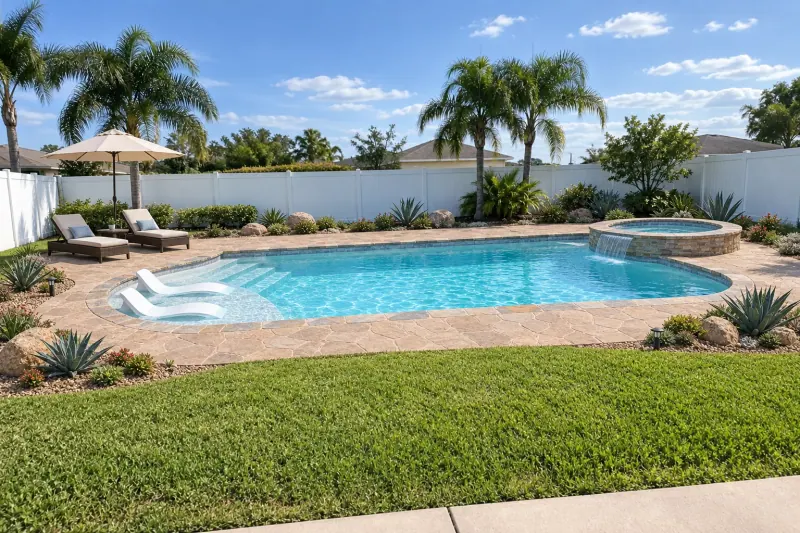
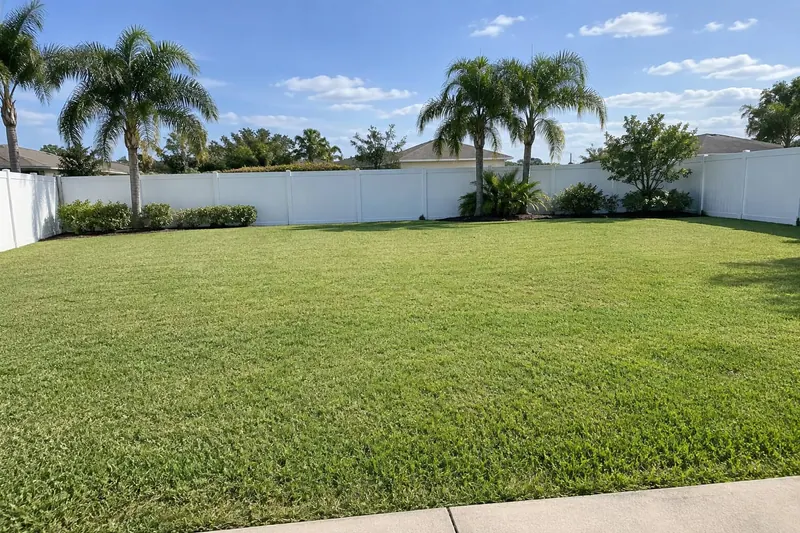
Florida lawn: A roman pool with a round hot tub, loungers and a flagstone deck
Made with this free tool on our sample yards. AI images, not designs or quotes. How we label AI images
Free. About a minute. No account.
How the pool visualizer works
- 01
Take a photo of your yard
Stand at the back door or on the patio and take one photo, phone held sideways.
- 02
Check where the pool goes
We pick a spot on your yard. Looks right? One tap. If not, drag it where you want it.
- 03
Start from a look, change what you like
Pick a look and a 3D pool appears. Then change anything a builder would ask: shape and size, hot tub, steps and sun shelf, finish color, tile, coping, deck, planting and water features.
- 04
See it in your own yard
We draw the pool into your photo, from where you stood. Slide between the before and the after, then save or share it, or try another version.
Everything you can choose
The same decisions a pool builder walks you through before drawing the real one. Every choice starts on a common pick, so you can skip any of them.
Pick a shape and size
- Shape
- Rectangle, Roman, Freeform, Kidney, L-shape, Grecian
- Size
- Fill the area I marked, Plunge 8 × 16, Small 12 × 24, Classic 15 × 30, Large 18 × 36, Extra large 20 × 40, Lap 10 × 40
Add a hot tub
- Hot tub
- No hot tub, Spills into the pool, Raised, spills over, Separate tub
- Hot tub shape
- Round, Square
- Where the hot tub goes
- Left end, Right end, Far side
Steps, sun shelf and edge
- Steps
- Wide steps, Corner steps, Curved steps, Steps and a bench
- Sun shelf
- No sun shelf, Sun shelf, With loungers, With an umbrella
- Pool edge
- Standard, Vanishing edge, Raised wall
Finish, tile and coping
- Pool finish
- Plaster, Quartz, Pebble, All tile
- Finish color
- White, Light grey, Blue, Tan, Midnight
- Waterline tile
- Blue glass, Grey stone, White, Charcoal, Sea glass
- Coping
- Travertine, Concrete, Flagstone, Brick, Porcelain
Deck and yard
- Deck
- Travertine pavers, Concrete pavers, Stamped concrete, Light concrete, Porcelain tile, Wood-look deck
- Planting
- Keep what's there, Tropical, Desert, Lawn and hedges, Modern
- Pool fence
- No fence, Glass, Black aluminum, Removable mesh
- Furniture
- Loungers, Umbrella, Dining table, Outdoor sofa
- Add to the yard
- Pergola, Cabana, Outdoor kitchen, Fire pit
Water features and light
- Water features
- Sheer descents, Deck jets, Bubblers, Scuppers, Rock waterfall, Fire bowls
- Show it at
- Same light as my photo, Midday sun, Golden hour, Night, lights on
- Pool light color
- White, Blue, Teal, Violet
What it can't tell you
The image is a concept, not a design or a quote. It doesn't check setbacks, slope, soil, utilities, HOA rules or permits, and a photo has no true scale, so sizes are close, not measured.
It draws in-ground pools only. The range it shows is a planning range, not a quote. A licensed pool builder near you measures the yard, designs it properly and gives the real quote.
Every image is labeled as AI. How we label AI images.
What happens to your photo
We don't train AI on your photo and we don't share it with anyone. It's used to draw your pool and nothing else.
We also note roughly where you are, at city or state level, from your network, to see where interest comes from. It's never your address.
Your photo and the image are deleted after 30 days. Until then the share link is private: only people you send it to can open it.
Your progress is saved only on this device, so a reload picks up where you left off. It clears after 7 days.
If you ask us to email your design and range, we keep your email and the choices you made for 30 days, only to send it. We don't add it to a mailing list.
More on how we handle files: Trust and security and our privacy policy.
Questions about the pool visualizer
Is the pool visualizer really free?
Yes. There's no charge, no card and no account. We ask for an email before showing the image, and draw up to six pools per person a day so it can stay free.
Do I need to download an app?
No. It runs in the browser on your phone or computer. Take the photo, then open this page and choose it.
How long does it take?
A minute or two after you press the button. Keep the tab open while it draws.
Can it show a hot tub, sun shelf or vanishing edge?
Yes. You can add a hot tub that spills into the pool, level or raised, a sun shelf with loungers or an umbrella, a vanishing edge or a raised wall, water features, and night lighting.
Does the pool visualizer show what the pool costs?
Yes. As you choose a shape, finish, hot tub and deck, it shows a planning range, not a quote, from the same published cost sources as our pool ideas, for the US or your state.
Does it work for above-ground pools?
Not yet. It draws in-ground pools only.
How accurate is the size?
Close, not measured. A photo has no true scale, so the size you pick and the area you mark guide the drawing. A pool builder measures the yard before designing the real one. To check a size against your own yard, try the will it fit planner.
Who makes it?
RenderSplash, which makes video software for pool builders. The visualizer is our free tool for homeowners. Builders can see what RenderSplash does for them.
Last updated: